

The world’s leading publication for data science, AI, and ML professionals.
An introduction to productionizing a machine learning model using APIs and Docker.
The title of data scientist is ever-changing and often vague. It usually involves one who is fluent in mathematics, programming, and machine learning. They spend time cleaning data, building models, fine-tuning, and conducting experimentation. They must also have great communication skills, a good grasp on their domain, and other soft skills.
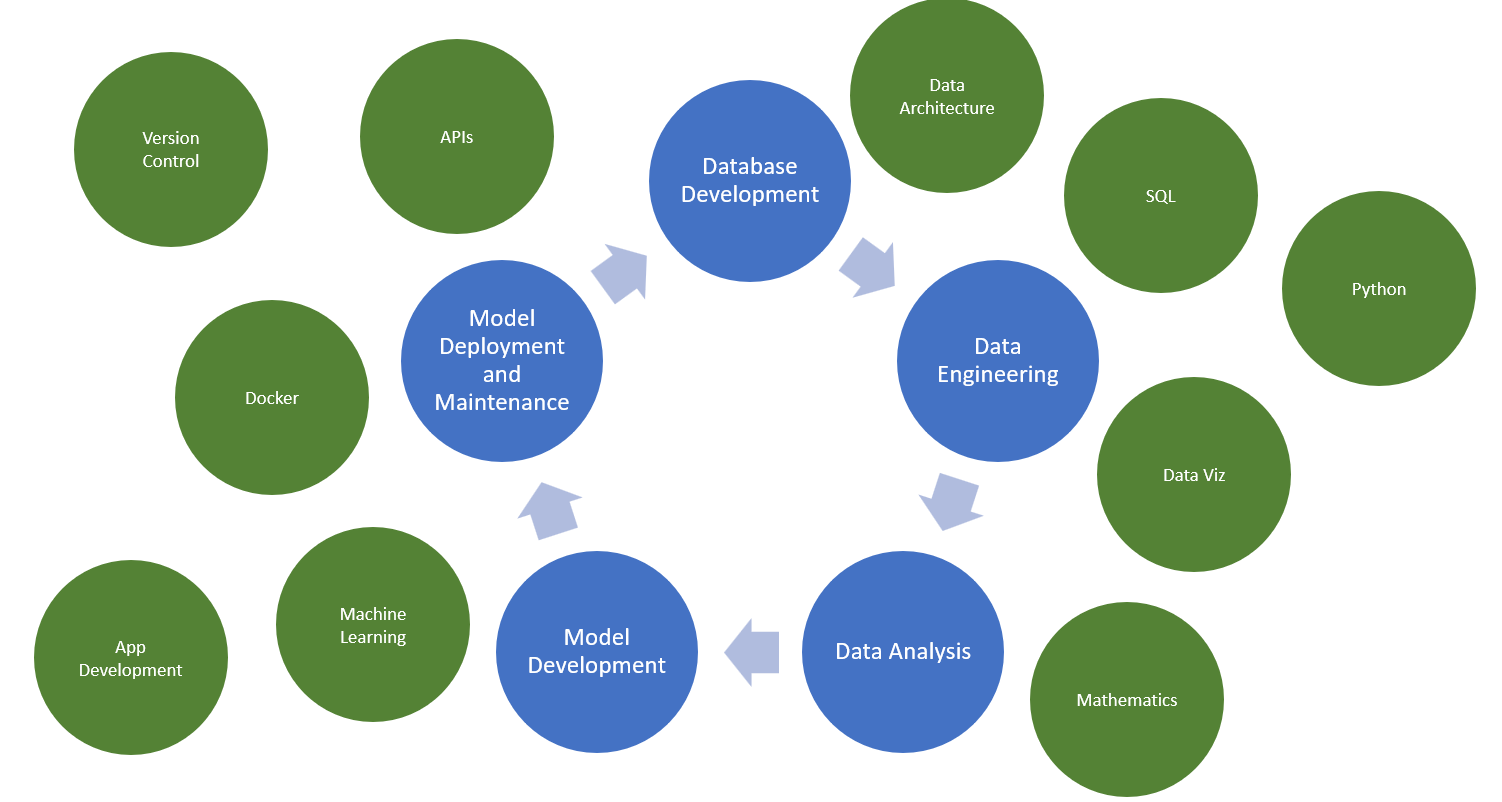
However, this is not always exactly the case. If you spend enough time scrolling through job boards, "Data Scientist" can differ quite a bit. Some read more like a data engineer, focusing on pipelines and big data platforms. Some are closer to a data analyst, focusing on data cleaning and dashboarding. And as of late, there are many that are similar to software or ML engineering, focusing on object-oriented programming, building applications, deploying models, and sometimes even web development.
And there are those who expect all of this and more, thus, the "full-stack Data Scientist". With this in mind, data scientists should consider looking to go beyond developing models in a notebook and expand their skillset to other areas like ML Ops. As Pau Labarta Bajo says: "ML models inside Jupyter notebooks have a business value of $𝟬.𝟬𝟬".
This article will go over how data scientists can successfully deploy their machine learning models from notebooks to fully productionized APIs by using FastAPI and Docker.
First, my personal opinion on the "full-stack data scientist". With all of these emerging expectations, it is important for us to learn and be comfortable with other skills that we may not have learned in our education or early career. However, the expectation seems to be to master all of these skills, on top of keeping up with traditional Data Science. And while there are a few out there who are capable of this, it is not feasible for most of us.
I don’t believe that becoming a full-stack data scientist means mastering every one of these skills, technologies, etc. I think that a full-stack data scientist is about being able to wear all of the hats in the data science lifecycle through continuous learning and development.
While it may not be my expertise, I should be able to collaborate with data engineers to optimize pipelines. And while I am much more comfortable with developing models, I should be able to wear my "ML Engineer" hat and help get a model into deployment. A great data scientist will always have their niches, but will also have a working knowledge of other areas and can quickly learn new skills if and when they need to.
First, for our example, we need to develop a model. Since this article focuses on model deployment, we will not worry about the performance of the model. Instead, we will build a simple model with limited features to focus on learning model deployment.
In this example, we will predict a data professional’s salary based on a few features, such as experience, job title, company size, etc.
See data here: https://www.kaggle.com/datasets/ruchi798/data-science-job-salaries (CC0: Public Domain). I slightly modified the data to reduce the number of options for certain features.
First, let’s take a look at the data.
Since all of our features are categorical, we will use encoding to transform our data to numerical. Below, we use ordinal encoders to encode experience level and company size. These are ordinal because they represent some kind of progression (1 = entry level, 2 = mid-level, etc.).
For job title and employment type, we will create a dummy variables for each option (note we drop the first to avoid multicollinearity).
Now that we have transformed our model inputs, we can create our training and test sets. We will input these features into a simple linear regression model to predict the employee’s salary.
Let’s see how our model did.
Looks like our R-squared is 0.27, yikes. A lot more work would need to be done with this model. We would likely need more data and additional information on the observations. But for the sake of this article, we will move forward and save our model.
There are several ways to deploy a model. One of those ways is with an API. An API (Application Programming Interface) enables two pieces of software to communicate with each other. There are several API architectures like SOAP, RPC, and REST APIs. We will use a REST API, which is the most popular and flexible architecture to access a service.
For our framework, we will use FastAPI (https://fastapi.tiangolo.com/), which is great for beginners as its fairly easy to use and has tons of documentation and examples.
With REST APIs, there are five methods that are commonly used: POST, GET, PUT, PATCH, and DELETE. These correspond to create, read, update, and delete operations. Our script below (Main.py) will follow these steps:
Now let’s use the command line to test the API. First, change the directory to your project. Then, run the API using uvicorn.
The command line gives me a link to follow. I am then greeted with the message from the GET endpoint. Nice!
Lastly, let’s create a test script to submit new data and retrieve a prediction. Using the requests library, we define the URL and submit a new observation.
The prediction is then returned in JSON format thanks to the POST endpoint. Great, we have a functioning API!
Now we have a way to interact with our model, but the model is still not deployed. Let’s say we have a team of 20 people, all of whom we want to have the API running on their computer. This is likely to be a headache. Replicating data science applications can be challenging as there are a number of roadblocks, such as different operating systems, dependencies, tech stacks, etc.
This is where Docker comes in. Docker is a platform that enables developers to package their applications and all of their dependencies in "containers". Anyone who has access to a container can run the application without worrying about downloading the correct versions of packages, changing operating systems, etc. Docker containers are also very fast and lightweight, giving an advantage over virtual environments or machines.
Download Docker Desktop here: https://www.docker.com/
Before we create a container, we must first create an image. A Docker image is a snapshot of the application and its dependencies. It basically outlines the instructions for the container.
To create an image, you must create a Dockerfile (https://docs.docker.com/reference/dockerfile/). The Dockerfile is a text-based document that is stored inside the project and provides the instructions on how to assemble the image. The Dockerfile cannot be a .txt file. It must have no extension. The easiest way to create a Dockerfile is through VSCode. Simply add a new file, and name it "Dockerfile".
I built the following Dockerfile using their beginner documentation. It follows these steps:
Now that we have our Dockerfile, we can create the image with the following command. The name of the image will be "apiserver".
If we navigate to Docker Desktop, we can see that the image was successfully created.
Now that we have an image, creating the container is very simple. Once we run the image with a few instructions, the container is created. Below, we run the image and specify the port.
If we navigate back to Docker Desktop again, we can see the container. Docker gives containers random names, which can become difficult to track. If you develop many applications, it is useful to rename them.
The model is now deployed! Going back to our team of 20, all they need is Docker installed on their machine and access to our container. Then they can run the container and use the API as needed.
In conclusion, with new expectations for data scientists, it is vital to learn other skills like software engineering and ML Ops. The need for "full-stack data scientists" is growing as organizations need those that can engage in all stages of the data science lifecycle.
Taking machine learning models out of notebooks and into production is a great first step to become a full-stack data scientist. By using tools like FastAPI and Docker, you can share the hard work it took to build your model by allowing others to use it too.
I hope you have enjoyed my article! Please feel free to comment, ask questions, or request other topics.
Connect with me on LinkedIn: https://www.linkedin.com/in/alexdavis2020/
Written By
Topics:
Share this article:
Step-by-step code guide to building a Convolutional Neural Network
Here’s how to use Autoencoders to detect signals with anomalies in a few lines of…
Solving the resource constrained project scheduling problem (RCPSP) with D-Wave’s hybrid constrained quadratic model (CQM)
An illustrated guide on essential machine learning concepts
Derivation and practical examples of this powerful concept
A quick guide to our resources and FAQ
Columns on TDS are carefully curated collections of posts on a particular idea or category…
With demos, our new solution, and a video
An illustrated guide to everything you need to know about Logistic Regression
Your home for data science and Al. The world’s leading publication for data science, data analytics, data engineering, machine learning, and artificial intelligence professionals.
Journey to Full-Stack Data Scientist: Model Deployment – Towards Data Science










Leave a Reply